


Findio: GPS phone tracker review
 Analysis by GetAllApps
I find location-sharing apps most useful when they reduce the small uncertainties of family life without turning a phone into a surveillance tool. Findio is a parenting app from Fortunex Limited built around that balance: it helps families share live location, but it works best when everyone understands why they are using it and agrees to participate. I’d consider it for coordinating everyday plans, not as a substitute for a conversation or a guarantee that someone is safe.
Where location sharing can get frustrating
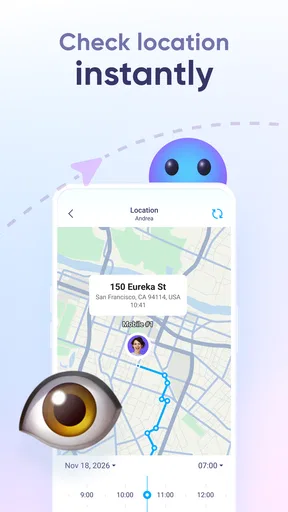
The main appeal is easy to understand: instead of texting “Where are you?” back and forth, family members can use a shared location view to see where one another are. That can be handy when a child is travelling to an activity, a parent is on the way home, or relatives are trying to meet in a busy place. Findio’s focus on parental control makes it more family-oriented than a general map used only for directions.
The first practical hurdle with any location-sharing app is that the map is only as useful as the people and phones connected to it. A family member who has not joined or is not sharing a location cannot be tracked through wishful thinking. Before relying on Findio for a pickup, I’d make sure each person who needs to appear has completed the setup and that everyone knows how to open the app.
Another common source of confusion is treating a location display as an exact, continuous account of someone’s movements. A phone’s location can be affected by its connection, settings, battery state, and surroundings. If a family member appears in an unexpected place or the display seems stale, I would first check in with them rather than assume the app has proved where they are or what they are doing.
This distinction matters especially for parents. Location sharing can make coordination easier, but it cannot replace judgement, age-appropriate boundaries, or a child’s ability to contact an adult directly. I’d explain the purpose of using Findio in plain language and agree on when it is helpful. That makes the app a tool for reassurance and logistics rather than a source of avoidable tension.
Set expectations before the first trip
A useful family routine is to test the app while everyone is together, before depending on it during a busy school run or an unfamiliar journey. Check that the intended people can see one another as expected, then try opening the app from each person’s phone. This simple rehearsal can reveal a missed setup step when there is still time to sort it out calmly.
I would also agree on a backup plan. If the map does not update, a quick call or message is more useful than repeatedly refreshing the screen. That is a small habit, but it prevents families from mistaking a technical delay for an emergency and keeps location sharing in its proper role: helpful context, not the only communication channel.
Setup checks that prevent avoidable problems
Findio is free to download, and it is rated for Everyone. Its current version is 2.0.1, while the minimum operating-system requirement is 8.0. Those details make it easier to judge whether an older device is a likely obstacle before inviting a whole household to use it. I would check the operating system on every phone that needs to participate, rather than assuming that one compatible device means the family is ready.
During setup, take a moment to confirm that each family member is using the intended account and that the family understands who is sharing with whom. This is less glamorous than seeing the map, but it is the foundation of a reliable routine. If someone cannot see a relative, check the account and sharing arrangement before reinstalling the app or changing several phone settings at once.
Location access is another sensible check. The phone must be able to provide location information for a location-sharing app to do its job, so review the device’s location settings if the map does not show what you expect. I would make changes one at a time and then reopen Findio, which makes it easier to tell whether the adjustment helped. Exact menu names vary by phone, so follow the controls shown on the device rather than relying on instructions written for a different model.
It is also worth checking that the app is current through the app store. Findio has an average rating of 4.1 from around 7,400 ratings, with 483 written reviews, and it has passed one million installs. That scale suggests it has found a broad audience, but ratings cannot tell you whether it fits your family’s habits or whether a particular phone is configured correctly. I’d treat them as context, not a substitute for a brief household test.
Make the first check practical
For a low-stress trial, have one person leave for a familiar, short errand while another checks the shared view from home. Confirm that the right person appears and that the location makes sense in broad terms. Then close the app and return to it later. This tests the family’s actual workflow without putting anyone in a situation where a delayed update could disrupt a pickup.
One useful detail is to test both sides of the experience. The person sharing should know that the app is active and understand how to contact the family; the person checking should know where to look and when to stop relying on the map. That avoids a common mismatch in which one person expects constant visibility while another assumes they are sharing only occasionally.
Recovering a workflow when the map looks wrong
If Findio seems not to update, I would work through a short sequence instead of jumping to the conclusion that the app is broken. First, ask the person carrying the phone whether they are comfortable checking it. Next, confirm that the phone has a working connection and that location services are enabled. Then reopen the app and give the phone a moment to respond. These are basic checks, but they address many ordinary causes without changing a family’s setup unnecessarily.
If only one family member is missing, compare their setup with someone whose location is appearing. Check that they are signed into the intended account, have completed the sharing steps, and are using a supported operating system. A single-person problem often points to that device or its account rather than to a failure affecting everyone. Keeping the troubleshooting focused can save time and avoid disrupting other family members’ access.
If nobody’s location appears, consider whether the issue is broader: a temporary connectivity problem, a phone setting, or a need to reopen the app. I would avoid repeatedly uninstalling and reinstalling as a first response, since that may introduce fresh setup work without addressing the original cause. If the simple checks do not help, use the app’s available support route through the app store or its official website, rather than relying on guesses about what the software is doing.
A realistic example is a parent waiting at a sports practice while a child is meant to walk from school. If the location view has not changed, the practical response is to call or message the child and agree on a meeting point. The map can help guide the conversation, but it should not delay a direct check-in. This is one of the strongest ways to use Findio: as a convenient prompt for coordination, backed by ordinary communication.
Separate app trouble from a family-plan problem
Sometimes the map is working as intended, but the family has not agreed on what to expect from it. One person may assume the app is checked continuously, while another thinks it is only for specific trips. That mismatch can feel like a technical failure even when the underlying issue is unclear expectations. I would settle the sharing routine together and make sure children know they can still call, text, or ask for help directly.
It is also important not to read more into a location than it can establish. A displayed position does not explain why someone is there, whether they are safe, or whether they have seen a message. For younger children, a parent may need a more direct check-in; for older children, a discussion about privacy and trust may matter more than frequent map checks. Findio can support family coordination, but it cannot make those decisions on a parent’s behalf.
What Findio does well, and where another choice may fit better
Compared with using a messaging app alone, a dedicated location-sharing tool can reduce the need to request someone’s whereabouts each time plans change. Compared with a general-purpose map, Findio’s parenting focus makes it a more natural candidate for households looking for a family-oriented way to keep track of one another. The trade-off is that a location app adds another routine: people need to install it, set it up, and understand the sharing arrangement.
That trade-off is worthwhile if your family has recurring coordination needs, such as school pickups, activities, or meeting up while travelling together. It is less compelling if everyone already coordinates comfortably by calls and messages, or if the family does not want to share location. In that case, a direct message or the location tools already available on your phones may be simpler and more respectful of everyone’s preferences.
Findio includes in-app purchases ranging from $2.99 to $99.99 per item. I would look at the purchase details inside the app before paying for anything and decide whether the free experience already covers the household’s needs. The spread is wide enough that it is sensible to understand exactly what an item offers and whether it is a one-time purchase or otherwise presented, rather than treating every purchase as necessary for basic family coordination.
There is a practical privacy trade-off here, too. Location sharing is useful precisely because it reveals where people are, so it should be enabled only with a clear understanding among the people involved. For a child, the conversation can be age-appropriate and focused on safety and logistics. For teens and adults, making the arrangement transparent is likely to work better than presenting the app as a hidden monitoring measure.
Who I would recommend it to
I’d recommend trying Findio if you want a shared location option for family logistics and are willing to do a small amount of setup together. It may suit parents coordinating school and activity journeys, relatives travelling to the same destination, or households where a quick location check can replace repeated “Are you close?” messages. The best results are likely when everyone knows the app is being used and has a backup way to communicate.
I would skip it if you need guaranteed, uninterrupted tracking, if family members do not consent to sharing, or if your main need is detailed navigation rather than seeing where relatives are. It is also not the right answer to a family communication problem on its own. When trust, clear boundaries, or urgent contact matter most, a conversation and a direct call are more appropriate than checking a map.
My practical verdict is that Findio is worth considering as a straightforward family coordination aid, provided you treat location as helpful information rather than a promise. Fortunex Limited has made an app in the parenting space that addresses a familiar everyday need, and its free starting point makes it possible to evaluate the setup before spending money. I would test it on the phones that will actually be used, agree on what sharing means, and keep ordinary calls and messages as the fallback. Used that way, it can make family plans easier without asking the map to do more than it can.
Pros and cons
Pros
- Location sharing can help families keep track of one another.
- A map view makes it easy to check a contact’s reported position.
- GPS tracking can be useful when coordinating meetups.
- Location updates may help users check that loved ones arrived safely.
- The app can provide a convenient alternative to asking for frequent updates.
Cons
- Tracking depends on the other person sharing their location.
- GPS accuracy can vary indoors or in areas with weak signals.
- Location updates may use extra battery power.
- Continuous location sharing can raise privacy concerns.
- Some features may require an internet connection or paid access.


